A 3D model is a mathematical description of an object in three dimensions, most often a polygon mesh of vertices, edges and faces, built by modeling, sculpting, scanning or numerical calculation.
This guide explains the parts of a model and the main ways to make one, as a starting point within the wider field of 3d modeling.
What a 3D model actually contains
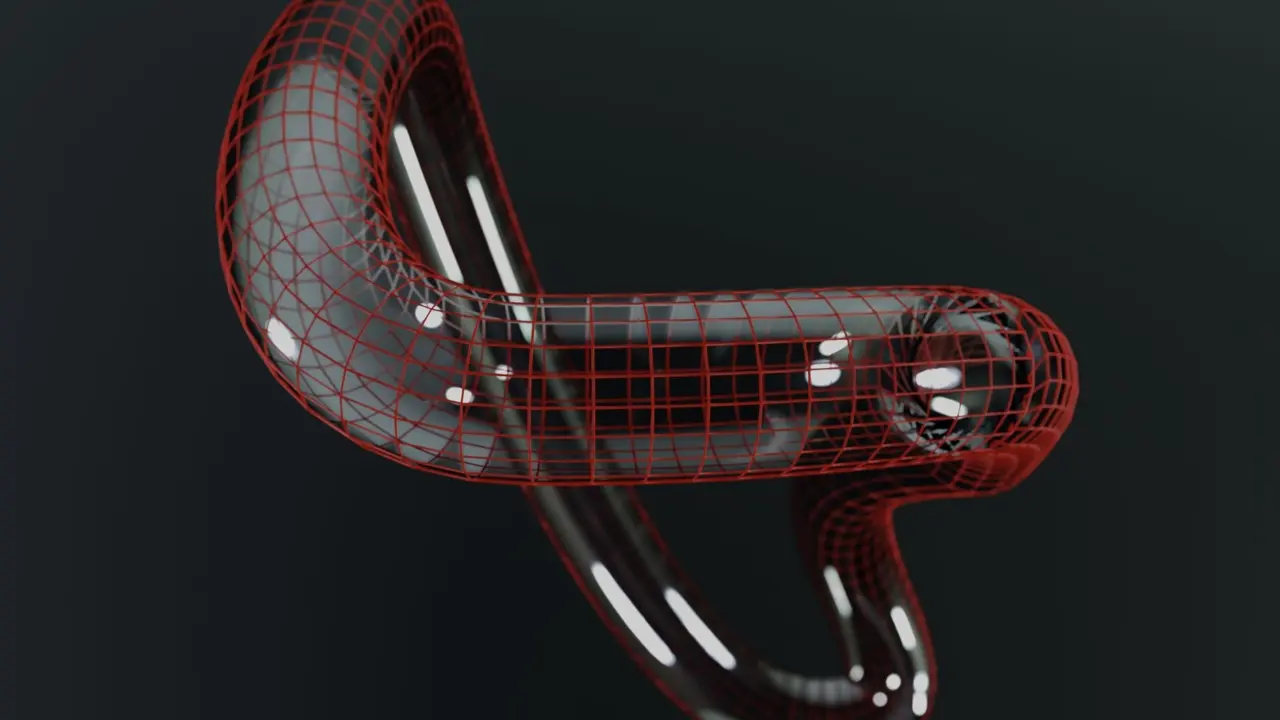
Wikipedia’s article on 3D modeling states that polygonal meshes are “by far the most common representation” of a model, so a mesh is the best place to start. A mesh is a collection of three kinds of element: vertices (points), edges (lines joining two points) and faces (flat surfaces bounded by edges).
The same source on polygon meshes notes that “The faces usually consist of triangles ( triangle mesh), quadrilaterals (quads), or other simple convex polygons ( n-gons).” A vertex stores a position in space and can also carry optional attributes, such as colour or surface direction, that a renderer uses to draw the object correctly.
A mesh alone is only a shape. Production models usually add a texture, which is a flat image wrapped over the surface, and sometimes a skeleton for animation. The Wikipedia entry illustrates this with a wire-frame model, an untextured model, a flat texture artwork and the artwork applied to the model, which shows how the same geometry looks different once the surface image is added.
Four ways to represent a model
The 3D modeling article lists four popular ways to represent a model, and each one suits a different job.
- Parametric modeling builds a shape from features with parent-child relationships, which is why it dominates mechanical CAD. Change one dimension and the dependent features update.
- Polygonal modeling connects vertices with line segments to form a mesh. It is flexible and fast to display.
- Curve modeling defines surfaces with curves such as splines and nonuniform rational B-splines (NURBS), which give smooth surfaces from few control points.
- Digital sculpting pushes and pulls a dense surface the way a sculptor works clay.
The reason polygons win in entertainment is practical. According to the same article, “The vast majority of 3D models today are built as textured polygonal models because they are flexible and because computers can render them so quickly.” Engineering teams often prefer parametric tools instead, because editing a dimension later matters more to them than render speed.
How a model is built step by step
The manual process of preparing geometry is, per Wikipedia, similar to plastic arts such as sculpting, and most projects pass through the same four stages.
- Source the shape. The geometry can come from a designer or engineer in a CAD system, from a real object copied with a 3D scanner, or from numerical data.
- Block out the form. The modeler starts with primitives such as spheres and boxes and adds detail gradually.
- Refine the surface. Edges are arranged so the mesh bends cleanly, and detail is added by subdividing or sculpting.
- Texture and finish. Images are mapped onto the surface and the model is exported for its final use.
Digital sculpting itself has three types. The most widely used, displacement, takes a dense model, often produced by subdividing a polygon control mesh, and stores adjusted vertex positions in an image map. That approach lets an artist add pores or fabric weave without hand-placing every point.
Where finished models end up
Three outputs account for most finished work: images, simulations and physical objects. A model can be shown as a two-dimensional image through rendering, or used in a computer simulation of physical phenomena. Rendering engines often split surfaces into triangles first, because a triangle is always planar and easy to rasterize.
The third route is the physical one. Wikipedia explains that a model can be made with 3D printing devices that form 2D layers of the material “one layer at a time”. Printing places extra demands on a model, such as a fully closed surface, which the sibling guide on 3d modeling for 3d printing covers in detail.
Architecture, video games, visual effects, virtual reality and product design all use the same underlying mesh or CAD data, though each exports it differently. The container used for that export is a separate topic, explained in the guide to 3d model file formats.
Why mesh quality matters
Two meshes can look identical in a still image and behave very differently, because three-sided triangles and four-sided quads each have strengths. Triangles are always flat, which is why graphics hardware handles them so reliably. Wikipedia’s polygon mesh article adds that renderers can accept quads and larger n-gons directly or convert them to triangles on the fly, so a modeler rarely has to store a mesh in triangulated form.
Modelers still favour quads while working, because rows of four-sided faces form clean loops around features such as an eye or an elbow. Those loops let a surface bend predictably when it is animated or subdivided. Triangles and n-gons are tolerated on flat areas that never deform, but they can create pinching on curved ones.
Detail level is the other trade-off. A dense mesh captures fine surface features, yet it costs memory and render time, which is the reason the displacement method of sculpting stores fine detail in an image map instead of in extra geometry. A low-polygon mesh with a texture can imitate that detail at far lower cost. Game artists often build a dense sculpt first, then bake its detail into the texture of a light mesh.
Clean geometry also matters outside rendering. A mesh with holes or overlapping faces may display fine yet fail when a printer slicer or a simulation tries to treat it as a solid, so checking a model before export is a routine final step.
Choosing a representation for a project
Matching the method to the goal avoids rework. A machined bracket needs exact, editable dimensions, so parametric CAD is the standard choice. A game character needs a light mesh that renders quickly, so polygonal modeling with sculpted detail fits. A smooth product shell, such as a car body panel, often calls for NURBS surfaces.
Mesh storage also varies. Smith (2006), cited on the polygon mesh page, compares storage schemes such as vertex-vertex, face-vertex, winged-edge, half-edge and quad-edge, each with its own trade-off between lookup speed and memory. Most beginners never choose one, because their software does it automatically.
Frequently asked questions
What is a 3D model made of?
What is a 3D model made of?
Most are polygon meshes made of vertices, edges and faces. The Wikipedia polygon mesh article says the faces are usually triangles, quadrilaterals or other simple convex polygons.
Which type of 3D model is most common?
Which type of 3D model is most common?
Polygonal meshes. Wikipedia’s 3D modeling article calls them “by far the most common representation”, with subdivision surfaces a distant second.
Is CAD modeling the same as sculpting?
Is CAD modeling the same as sculpting?
No. CAD uses parametric features with parent-child relationships, one of the four representation methods listed by Wikipedia, while digital sculpting edits a dense surface directly, like clay.
Can a real object become a 3D model?
Can a real object become a 3D model?
Yes. Wikipedia notes that geometry can come from an existing object copied with a 3D shape digitizer or scanner, and the resulting scan is then cleaned up as a mesh.